
Deployment & Operations
What Is a Microservice? When to Use It and When Not To
What is a microservice, how does it differ from a monolith, and when should you not split yet? Explained through a small online shop.



In the previous article, our small online shop had four jobs: accounts, products, cart and orders, and confirmation email. Suppose you have already split them into four services. Now a very practical question comes up. When a customer clicks “Place order”, how does the order service know the price of a product? And how does it tell the email service to send a letter?
In this article, we will look at two common ways services call each other (REST and message queues). We will also talk about the role of the API gateway and how to choose the right approach for each situation.
Quick summary
- REST: One service sends a request to another service and receives a reply directly after the request has been processed.
- Message queue: The sending service puts a message in the queue and carries on with its work without waiting for a reply. The receiving service takes the message out and processes it when it is ready.
- Need an answer now? Use REST. Only need to report that something has happened? Use a message queue.
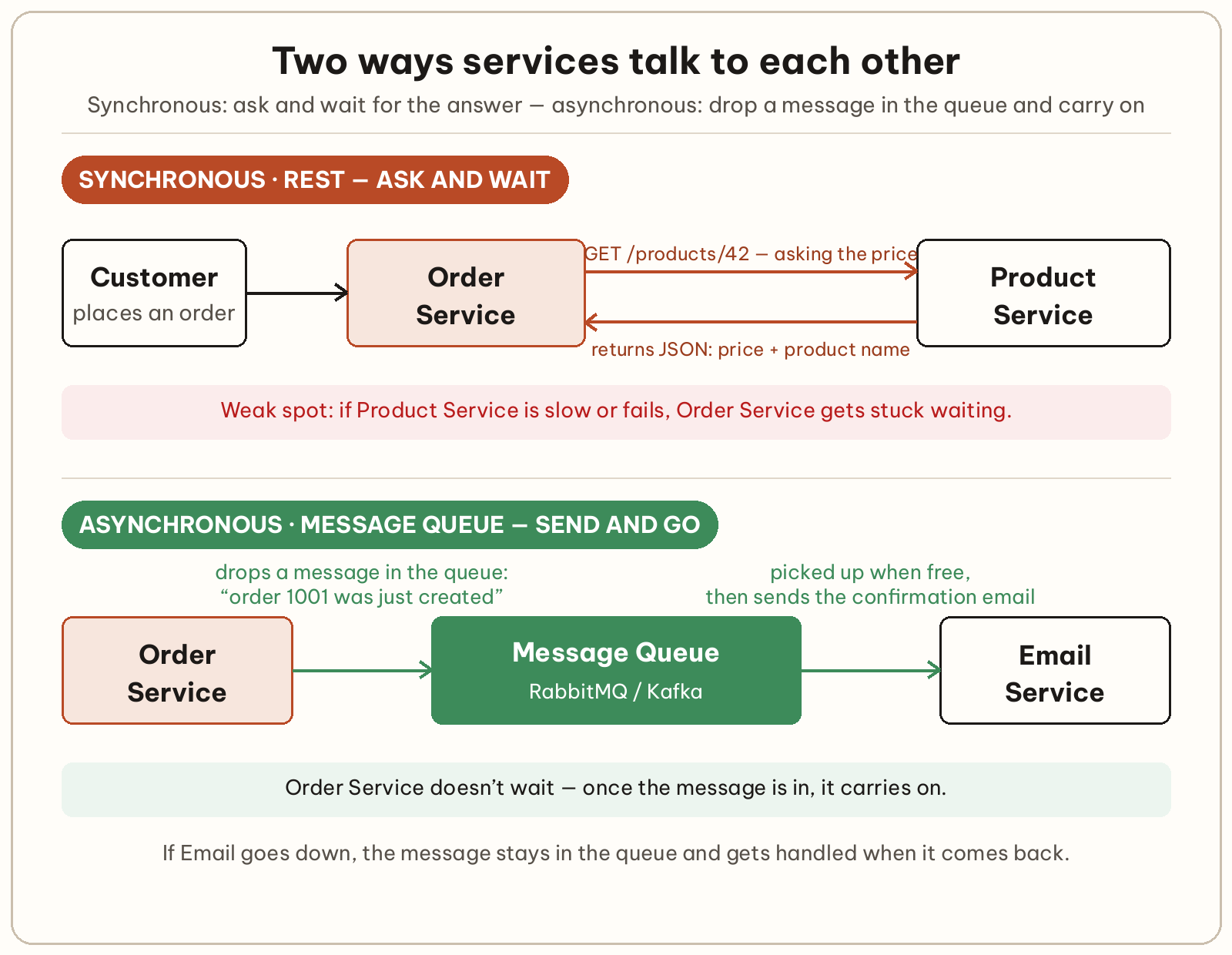
When one service needs data from another service, the simplest way is to send it over HTTP, usually called a REST API. You have already met this style of call if you have used an API in a browser. If not, the article about APIs explains it in more detail.
In the online shop, the order service wants to know the price of product 42. It has to send a request to the product service:
curl http://san-pham/products/42This calls a service called san-pham (an example name) and asks for information about product 42. The expected result is a piece of JSON containing the price and the name of the product:
The advantage of REST is that it is easy to understand and easy to try, because you can call it with curl as above. The drawback is in the word “wait”. If the product service is slow or failing, the order service gets stuck too. The failure then spreads from one service to the next. So every call needs a time limit (timeout). You also need a plan for the case where there is no answer.
Some jobs do not need an answer straight away. After an order is created, the order service only needs to report “order 1001 has just been created” so the email can be sent. The customer does not have to wait for the email to be sent before seeing the “Order placed successfully” page.
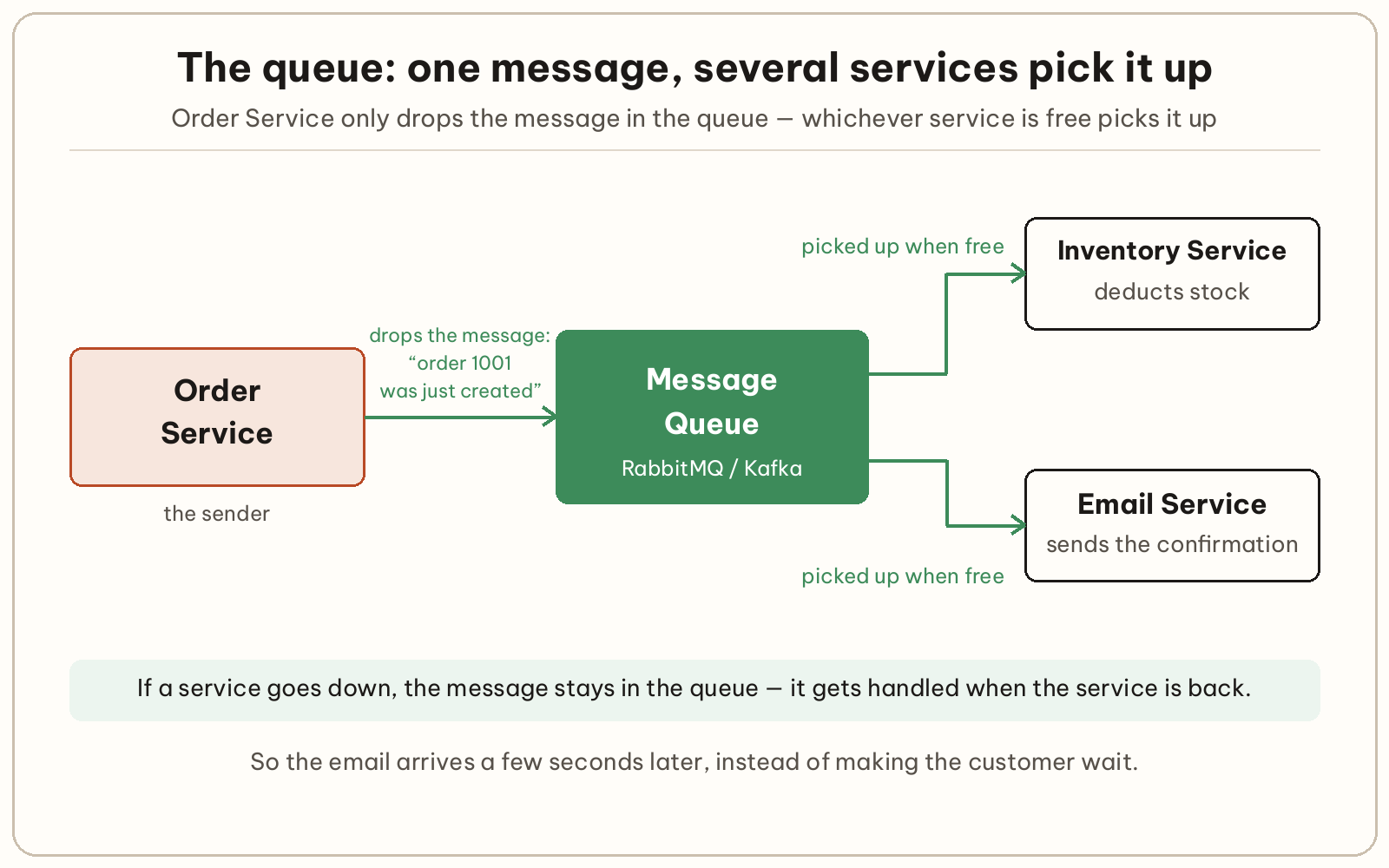
For this kind of job, people use a message queue. The order service puts a message in the queue and carries on with its work. The email service takes the message out and sends the email. The stock service takes the same message and deducts the stock.
The biggest advantage is that the two sides do not depend on each other in time. If the email service is temporarily down, the message stays in the queue and is handled when the service is back. You can also add more workers to process messages faster when orders spike.
Use REST when the caller needs an answer to carry on. Use a queue when the caller only needs to report that something has happened.
A browser or phone app should not call each service directly, because then it has to know the address of every service. Instead, an API gateway sits in front, acting as a reception desk. Every request from outside goes through a single address. The gateway then forwards it to the right service.
In the online shop, a request to /products goes to the product service, and a request to /orders goes to the order service. The gateway is also a sensible place to check login once, instead of each service doing it separately.
Quick rule: ask whether the caller needs an answer to carry on.
| Situation | Approach | Why |
|---|---|---|
| The order service needs the product price | REST | It cannot create the order without the price |
| Sending the confirmation email after an order | Message queue | The customer does not need to wait for the email |
| Deducting stock after an order | Message queue | It can wait a few seconds; add a compensating action if it fails |
| The browser calling into the system | API gateway | One address for the outside world |
Start with REST everywhere you need an answer. Only add a queue when you meet a specific case where waiting slows down or breaks the experience. Adding a queue too early only means you have one more thing to run before you need it.
Take the drawing of your app’s parts from the previous article, and label each connection “ask” or “report”. A connection labelled “ask” uses REST. A connection labelled “report” is a candidate for a queue. Once you have the drawing, you are ready for the hands-on part. (Coming soon) will introduce the tool for running many services like these.
They can, but they should not if you want them to stay independent. When they share a database, a change to the table structure by one service can break the other service. You also lose the benefit of deploying them separately. Microservices usually let each service keep its own data. Services exchange information through APIs or queues.
No. The two approaches solve two different kinds of job. A queue does not return an answer straight away, so it cannot replace a call that needs a result to carry on.
The caller needs a time limit and a way to handle the case where it gets no result — for example, showing a “try again” message. Fowler and Lewis stress this too: a microservice application must be able to cope with the failure of another service.
Sources (checked 14 November 2026)
Full-stack developer

What is a microservice, how does it differ from a monolith, and when should you not split yet? Explained through a small online shop.

Picture this: your laptop is at home, your phone is with you, and a server sits somewhere else. To open the server’s admin page from outside, you usually have to open a port on your router — which means configuring the router and leaving that port exposed to the internet. Tailscale skips that step: it connects...

This article is a quick reference for the Docker commands beginners use most. The commands are grouped by task and shown with real examples. You’ll learn which command to use when, how to check things and clean up, and how to fix common errors. It sticks to the basic commands beginners usually need, and doesn’t go...
Comments
You can use your Google account to comment. Google only shares your verified name and email address to display your name. You can log out at any time.
Sign in with GoogleNo comments yet. Be the first!